Key takeaways
- YouTube does not show teachers a list of viewers, only counts in Analytics.
- The practical way is participation: who wrote in chat, who answered a quiz.
- A Fastest Finger First quiz gives you a saved leaderboard of students by name for every session; a Google Form gives you a formal register.
In a classroom you call out names. In a YouTube live class you can't see your students, and YouTube won't tell you who watched: Analytics shows how many people watched and for how long, never who. So attendance on YouTube is really participation: who showed up in the chat. Here are four ways to capture it, from quickest to most formal.
1. Chat roll call
At a fixed point in class, ask everyone to type a set word: "Type your roll number" or "Type PRESENT". The names appear in the chat, which stays with the stream replay so you can scroll through it afterwards.
- Tip: do it in the middle of class, not at the start, so you capture who actually stayed.
- Limit: counting hundreds of messages by hand is slow.
2. A poll for a quick headcount
A native YouTube poll ("Did you finish the homework? Yes / No") shows how many students are active right now. It gives you a count and percentages, not names, so treat it as a pulse check.
3. A quiz that records names: Fastest Finger First
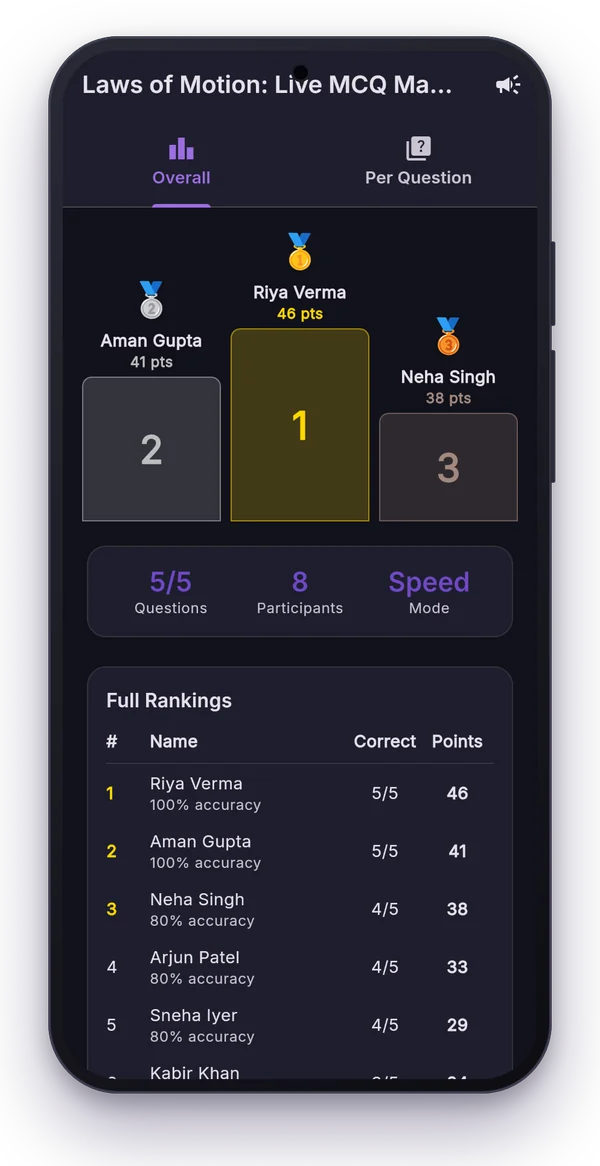
This is the one that doubles as teaching. Run a short Fastest Finger First round of five questions. Students type A/B/C/D in chat and Polls Patamde ranks them. Every session is saved in History with its leaderboard of student names and scores, so you have a record of who took part and how they did, without counting anything yourself.
Names are the students' YouTube channel names, so ask your batch once to use a name you can recognise (for example "Riya Sharma 10B" instead of a nickname).
4. A Google Form register
If your school or institute needs a formal register with roll numbers, pin a Google Form link in chat for the last five minutes of class. It's the most formal option, but students have to leave the stream to fill it, so keep it at the end.
Which should you use?
| Method | Names? | Effort | Best for |
|---|---|---|---|
| Chat roll call | Yes (in chat) | High, manual count | Small batches |
| Poll | No, count only | Low | Quick headcount |
| Fastest Finger First | Yes, saved leaderboard | Low, automatic | Daily participation tracking |
| Google Form | Yes, with roll numbers | Medium | Official records |
Many teachers combine them: a quiz for daily participation, and a form once a week for the official register.
Frequently asked questions
Can I see who watched my YouTube live stream?
No. YouTube Analytics shows how many people watched and for how long, but not who they were. You can only see the names of viewers who write in the live chat.
What is the easiest way to take attendance in a YouTube live class?
Ask students to type a fixed word such as their roll number in chat at a set time, or run a short Fastest Finger First quiz, which keeps a leaderboard of student names in the session history.